Page contents
How do I draw up the head loss inventory of an air or water network?
The head loss inventory is the item-by-item balance of everything that slows the fluid between the inlet and the outlet of a run: each straight length (major loss λ L/D × ½ ρ V²), each bend, tee, valve, entry or exit (minor loss K × ½ ρ V²), the equipment whose manufacturer states the loss (filter, heat exchanger, coil) and the level differences. The sum gives the pressure or head the pump or fan must supply at the flow considered; recomputed for several flows, it plots the system curve, which crosses the machine curve at the operating point. Example: an extraction of 1,000 m³/h in a 150 mm duct (15.7 m/s) with 15 m of duct, a hood, three bends, a 250 Pa filter and an outlet: 925 Pa in total, of which 318 Pa of friction; at 1,400 m³/h the same network needs 1,800 Pa.
Head loss balance formulas
- ΔPtotal: pressure loss of the run, in Pa (÷ ρ g to get it in m of fluid)
- λ: friction factor of each straight length, given by Colebrook from the Reynolds number and the roughness; L, D: length and diameter of the run, in m
- K: coefficient of each fitting, applied to the dynamic pressure ½ ρ V² computed with the velocity of its own section
- ΔPequipment: losses stated by manufacturers (filter, coil, exchanger, meter), rows entered manually in the inventory
- ρ g Δz: static head to overcome for a liquid (zero for air); ΔP(Q): system curve, a parabola through the computed point (ΔP₀, Q₀)
Head loss inventory of a 1,000 m³/h extraction run
| Element of the run | Coefficient | Pressure loss |
|---|---|---|
| Capture hood (entry) | K = 0.5 | 74 Pa |
| 15 m of straight duct | λ L/D = 2.14 | 318 Pa |
| 3 bends at 90° | K = 3 × 0.3 | 134 Pa |
| Bag filter (manufacturer's data) | 250 Pa at 1,000 m³/h | 250 Pa |
| Outlet to the outside | K = 1 | 149 Pa |
| Total for the run | 925 Pa |
System curve: pressure losses of the same run against flow
| Flow | Duct velocity | Total pressure loss | Fan power |
|---|---|---|---|
| 600 m³/h | 9.4 m/s | 338 Pa | 94 W |
| 800 m³/h | 12.6 m/s | 595 Pa | 221 W |
| 1,000 m³/h | 15.7 m/s | 925 Pa | 428 W |
| 1,200 m³/h | 18.9 m/s | 1,326 Pa | 737 W |
| 1,400 m³/h | 22.0 m/s | 1,800 Pa | 1,167 W |
Detailed explanations and calculation in Mecaflux
In Mecaflux Standard, the inventory of head loss, allows to see minor head loss and major head loss, as a table representing a segment of your network. The head loss inventory is accessible from the Tools menu or a button at the bottom of the tabs major head loss and minor head loss: "Load inventory of pressure loss". The inventory combines the results of your calculations, and displays a row for each calculation. The inventory load losses of the section can be recorded, and used for graphical analysis, et la resolution de point de fonctionnement d'un ventilateur ou d'une pompe: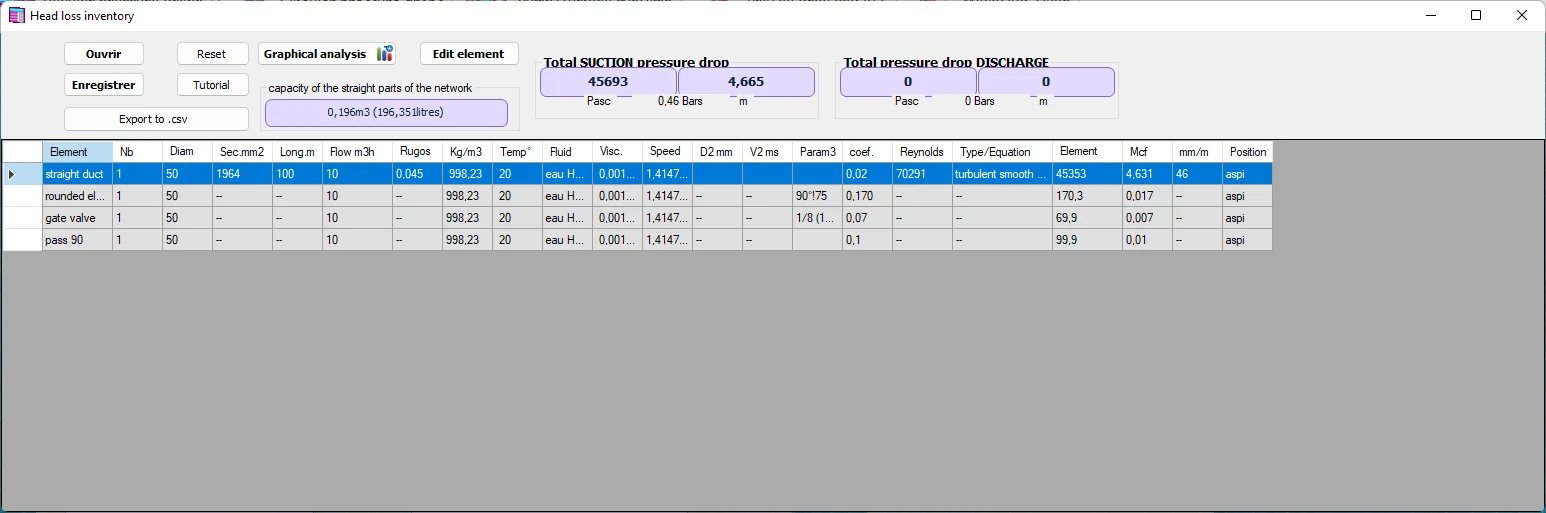
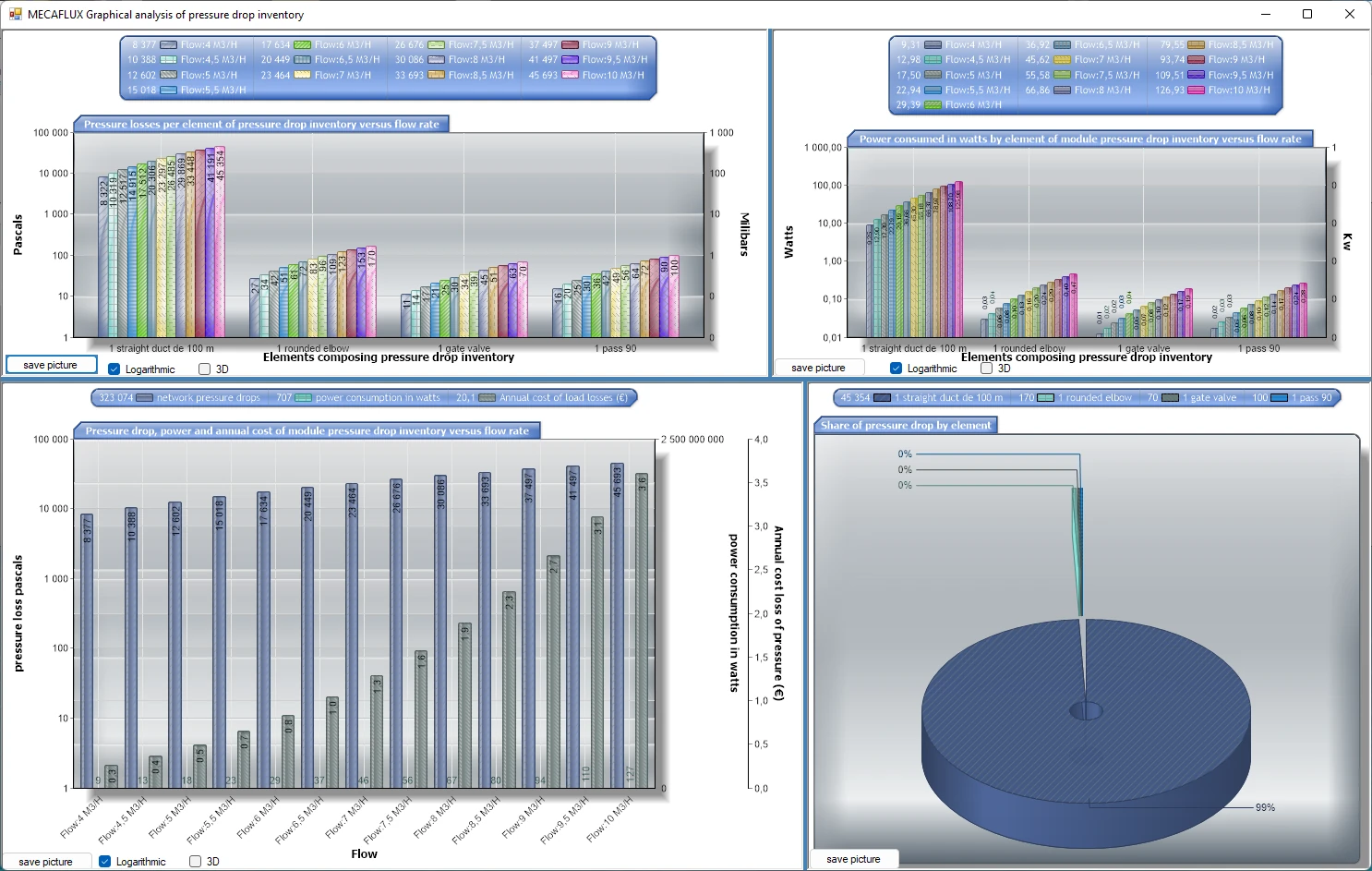
You can save the inventory of this network segment and use the graphical analysis , to test the segment at different flow rates, or find the operating point of a ventilation fan or pump if you know the curve of pressure versus flow:
See graphical analysis of aeraulic or hydraulic fluids network
- It is possible to disable some calculations, if you do not want, take it into account in the cumulation
- Increase the number of element
- modifier l'ordre des éléments
- Manually insert a line corresponding to a load device, as you know its loss, or vertical drop you want it to appear in the table.
- The different sections of the network can thus be positioned at the inlet or outlet of the pump, to test the cavitation in pump tab.
- The accumulated losses of loads can be found in the tab "pump and turbine", either the suction or the discharge of fan or pump turbine
- The inventory load losses can be edited in a spreadsheet , To process the data (graphics, sorting or printing)
Frequently asked questions
What is the inventory used for once it is drawn up?
To find the machine: the system curve, plotted by the graphical analysis from the inventory, crosses the pressure-flow curve of the fan or pump at the operating point, which gives the flow actually obtained and the absorbed power. Placed on the suction side of a pump, the inventory also serves to compute the available NPSH and to check the absence of cavitation; exported to a spreadsheet, it documents the calculation report.
How do I handle equipment for which only the manufacturer's pressure loss is known?
Insert it as a manual row of the inventory, with the stated loss at the rated flow (for instance 250 Pa at 1,000 m³/h for a clean filter). At another flow this loss varies roughly with the square of the flow, and the software recomputes it with the rest of the run. For a filter, take the end-of-life loss (clogged filter), often twice the initial loss, so that the fan keeps the flow.
Can K coefficients be added up when the diameter changes?
No: each K coefficient is defined for the dynamic pressure of its own section, and ½ ρ V² is multiplied by 16 when the diameter is halved. So compute the loss of each element with the velocity passing through it, then add the losses in pascals, never the K values. The Mecaflux inventory does this row by row, each calculation keeping its own diameter and velocity.
How do I draw up the head loss inventory of my own network?
In Mecaflux Standard, each major or minor loss calculation is added as a row of the inventory, which you can disable, multiply, reorder or complete with a manufacturer's value; the graphical analysis then plots the system curve and finds the operating point of a pump from the editor or of a fan whose curve you enter. For a branched or looped network, Mecaflux Pro3D, standalone-licensed network software, draws the runs in 3D and balances each branch automatically. For an installation to diagnose or design, Mecaflux carries out the study of your project and delivers the calculation report, or offers training on the software applied to your own network.