Global site map
 Mecaflux.com
 Slideshow software screens
 tutorials
 Download / Buy mecaflux
 Terms and conditions
 Major loss
 Minor loss
 Hydraulic Aeraulic pipes
  Pumps
Pumps Turbines
 Propellers
 Lift
Lift Drag
Drag Hydrodynamics
 Aerodynamics
 Site map
 Links
Links Examples internal flows
 Examples external flows
 Heliciel.com
 Table of Contents
 Heliciel software
 Aircraft Propellers
 Boat Propellers
 Wind Turbines
 Fans
Fans Turbines and tidal turbines
 Wings and hydrofoils
 Calculation methods propeller and wing
 Heliciel Site map
 Aero/Hydro Dynamics
 Propellers and turbines
 HELICIEL Software
 Heliciel software tutorials
 how to use software
 Blade or wing frame
 Specific functions and Case
 software discovery Video
  3D engine
 Purchases and downloads today
 references
 Tutorials Mecaflux Pro3D
 Tutorials Heliciel PRO CFD
 Mecaflux Store
 Compare software functions
 Quotes, Orders, Payment Methods
 Forum
Forum project technical studies
 English
 Francais
Tutorials
Tutorial mecaflux pro3D 1
List of Updates mecaflux PRO 3D
Mecaflux pro3D is a software who learns daily from its users, so give your opinion, propose updates and Download for free the result of your participation in the development of this software Collaborative.
All updates in one download :The latest version includes all previous, Download and run the installer below to update your software:
Version 3.0.0.2 du 2026-27-07
What's new in this new version?
- Switching to 64-bit—it's done! Version 3.0... Goodbye, 32-bit.
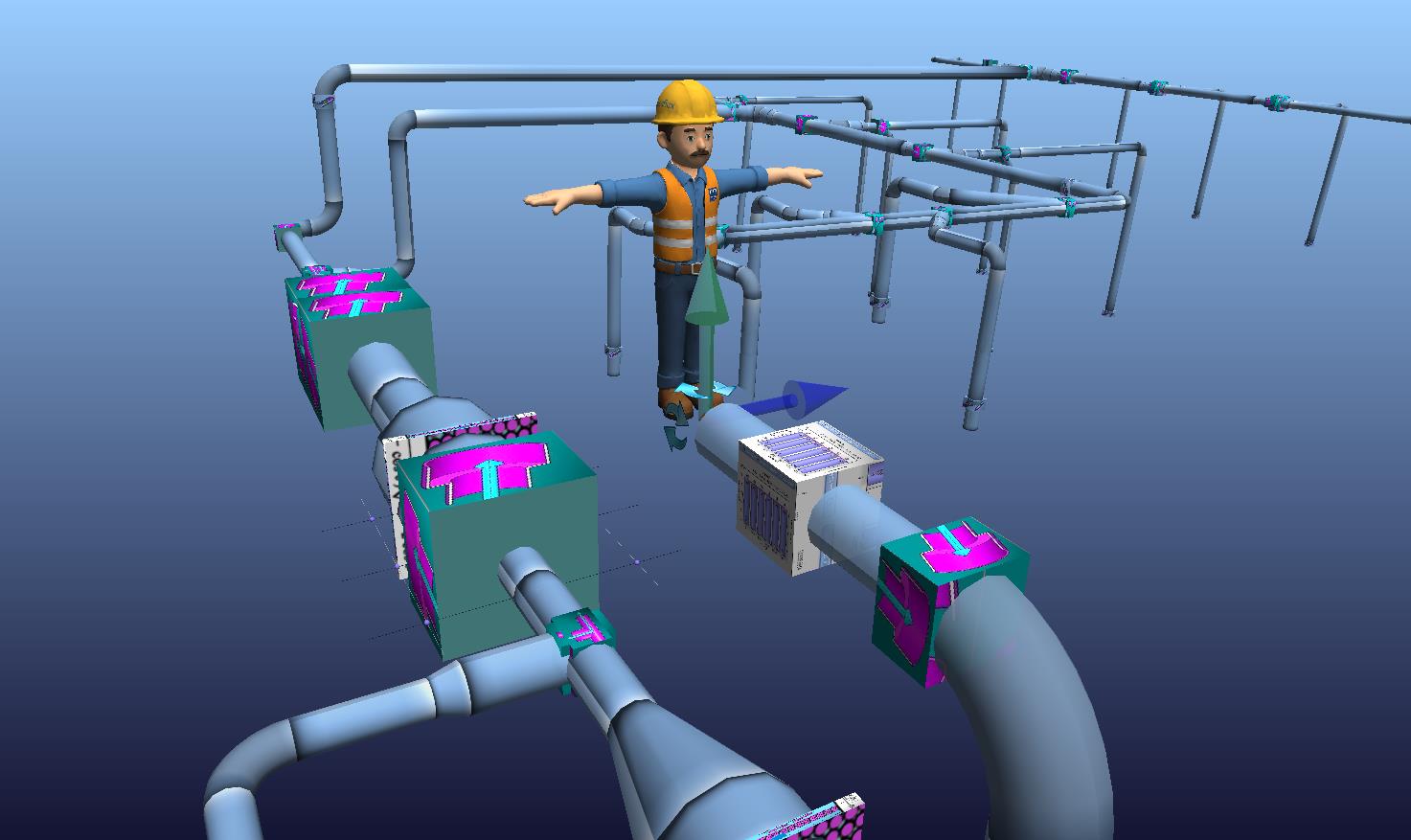
- Adding reference markers to make getting started easier: prompts to guide duct placement, and "Mr. Mecaflux" at the origin point to indicate the start of the network:
- Fixed a bug where diverter diameters failed to adjust when the diameter of the network's first pipe was changed.
- Added an "input circular section" option to the equivalent diameter tool to simplify diameter calculations based on the cross-section.
- Updated fluid properties within elements when the fluid type is changed (previously, this update only took effect during the operating point calculation, which could make it difficult to verify the correct fluid selection).
- Implemented in-app update downloading (via the "Download" menu)
- Fixed a bug causing a false-positive connection alert in negative-pressure zones, which could reverse the flow direction in a branch..
- Mecaflux is your software! ... Feel free to share your ideas for improvements—you'll see them implemented here!
This version includes all the previous ones.
What's new in previous versions?:
- Version 2.1.3.3 dated 2026-05-07 : Starting the construction of a section from the pump location is not always intuitive for the user, who may prefer to draw starting from the opposite end—for instance, to align with specific dimensional references. To ensure Mecaflux Pro 3D is as intuitive as possible, a new feature allows users to reverse the construction direction of an existing section (accessible via the right-click context menu), thereby simplifying its connection to other networks.
- Version 2.1.3.0 dated 2024-24-10 : Bug correction about saving network as élément.
- Version 2.1.2.9 dated 2024-17-09 :control conversion decimal separator on singulars elements parameters.
- Version 2.1.2.8 dated 2024-03-09:Detection conections in depresured zone alarm
- Version 2.1.2.7 dated 2024-14-05:Exchanger and annular ducts equivalents diameter tool added to tool menu.
- Version 2.1.2.6 dated 2024-27-02 :option for very low flow rate actived
- Version 2.1.2.4 dated 2024-16-02 : Fixed a grid display bug after resizing,Fixed bug updating valve coefficient values
- Version 2.1.2.3 dated 2024-09-02 : pumps editor images bug fixed, pumps editor files selection corrected, added NM3/m<=>m3/h convertor in tools
- Version 2.1.1.9 dated 2023-29-11: “save network from selected item” function has been corrected and added. This new function, accessible in the software's record menu, allows you to extract a part of the network, defined by the selection of the element where the part to be recorded begins. This makes it simpler to reproduce defined areas of an existing network.
- Version 2.1.1.6 dated 2023-11-06 configuration of the "documents" folder accepting specific location parameters, and specific network permissions
- Version 2.1.1.5 of 2023-06-15 Addition of a tool for calculating the equivalent hydraulic diameters of free surface channels, the equivalent diameter makes it possible to obtain a pipe of equivalent diameter, to determine the pressure losses of a channel open at the given flow rate. the user will thus be able to carry out gravity flow tests in channels with a free surface, on a slope: see the tutorial "calculate flow following slope": https://www.mecaflux.com/suite/didacticiels_pro3d.html
- Version 2.1.1.4 of 2023-06-13 Addition of a “Hyphenation” element to facilitate the representation of very long pipes
- Version 2.1.1.3 of 2023-05-11 Management of administrator authorizations, launching in a non-administrator session (after validation as an administrator) can be refused depending on network administration strategies. Correction: launching in a non-administrator session (after validation as an administrator) is made easier
- Version 2.0.99 dated 10/15/2019 The succession of messages to the pump registration could be confusing as to why the registration was canceled. Correction: Modification of the pump recording control timeline (the strictly decreasing curve warning now appears after input controls likely to cancel recording)
- Version 2.0.98 dated 07/31/2019 Improved compatibility with document folder paths on external servers

 :
:









































































.jpg)